

Eden Scorsese · Video
Edit video, with Eden beside you
A video editor for the Mac with a full timeline and the cuts editors know by key. Ask Eden to cut the pauses, caption an interview or make a vertical cut, and undo any of it in one step.
Free to download and edit · macOS 26 or later · Apple silicon · Signed and notarised

Eden › Cut the silences and filler words → found on this Mac · shown before it cuts · one undo
01 · The editor
Everything you need to cut a film
The editing is Scorsese’s own and works without an account, offline and free.
-
The timeline
Video, sound and caption tracks, with real waveforms and snapping.
- Insert , overwrite . lift ; and extract '
- Ripple, roll, slip, slide and blade tools
- Speed and duration, backwards, keep the pitch
- Cross dissolves and audio crossfades
- Mute, solo and lock each track
-
The viewer and inspector
Shuttle with J K L, and frame for 16:9, 9:16 or 1:1.
- Opacity, scale, position and rotation, with keyframes
- Exposure, contrast, temperature and saturation
- Voice volume, and a mix for each sound track
-
Your media
Drop movies, sound and stills anywhere on the window.
- HEIC, AVIF, camera raw, PSD and WebP come in as PNG copies
- Bins, and search that matches words in names
- Relink one file, its neighbours or a whole folder
-
Titles and captions
Add titles and write captions on their own track.
- Captions out as SRT or VTT, or burned into the picture
- Captions from what’s said come with Eden (below)
-
Versions
Your work is kept as you go.
- A version every two minutes while you edit, the last 30 kept
- Save a Version ⌥⌘S whenever you like
- A journal brings your work back after a crash
-
Export
Share online, a small file for review, a ProRes master, or the sound alone.
- H.264 and HEVC on the Mac’s hardware encoder
- Presets for YouTube, Vimeo and vertical video
- The project for other editors: OpenTimelineIO, FCPXML, FCP 7 XML or EDL
02 · Eden in Scorsese
Ask for the slow parts
Open the Eden panel with Ask Eden in the toolbar and say what you want. Eden uses Scorsese’s own commands, shows its steps as it goes, and everything it changes for one request is one undo.

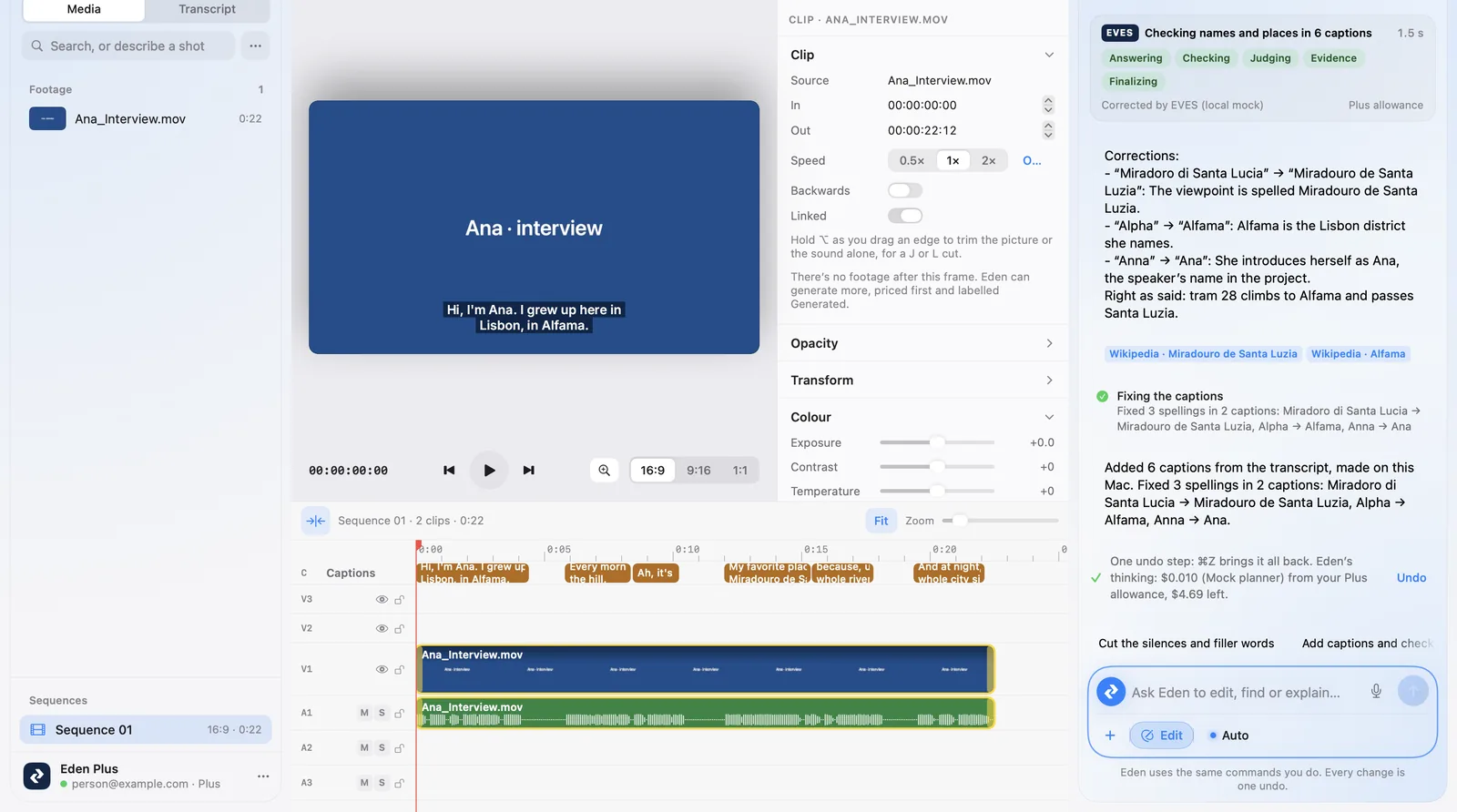
These pictures show the real app. While askeden.com’s side of Eden waits to go live, Eden’s answers in them came from a local test server, so some lines say “mock”.
What you can ask
| Ask | What Eden does | Runs | Costs |
|---|---|---|---|
| Cut the silences and filler words | Finds the ums and the long pauses in what’s said, keeps a little of each pause, and asks before it cuts. | On this Mac | Free |
| Add captions | Transcribes the speech with Apple’s on-device speech recognition and times captions to the words. | On this Mac | Free |
| Check the captions | EVES checks names, places and facts with three models, a judge and the web, then fixes the spellings. People’s words stay as they said them. | askeden.com | Plus allowance; asks first |
| Make a vertical cut | A new 9:16 sequence of whole sentences in story order, each shot centred on the face it finds, with captions. | On this Mac | Free |
| Build the cut from my script | Finds each line of your script in what was said and cuts the takes together in that order, listing any it couldn’t find. | On this Mac | Free |
| Cut to whoever’s speaking | With two cameras in sync, cuts the picture to the person talking. Asks first. | On this Mac | Free |
| Match the colour | Matches every clip’s colour to a reference shot. | On this Mac | Free |
| Make a Spanish version | A copy of the sequence with its captions translated on this Mac by Apple’s Translation (or by Eden, for a language the Mac can’t do). | On this Mac | Free |
| Read it aloud in Spanish | The translated captions read in the Eden voice on a new sound track, the original voices lowered. Priced first, labelled Generated. | askeden.com | Daily voice allowance (100,000 characters a day with Plus) |
| Fill the gap with B-roll | A shot of 3 to 15 seconds made from your words with Google’s Gemini Omni Flash, then trimmed into the gap. Priced first, labelled Generated. | askeden.com | Plus allowance, only if it succeeds. Illustrative: 4 seconds at 720p is $0.28 |
Eden works with your Eden account and Eden Plus, or with your own API key from Anthropic, OpenAI, Google or ElevenLabs, which bills you directly (Settings › Models & Services). With Eden Plus, its thinking for each request is paid from your Plus allowance, and the panel says what each request used and what’s left. The work in the table marked free runs on your Mac and costs nothing more. B-roll is priced at the model’s list price per second: today about $0.023 at 360p, $0.07 at 720p and $0.104 at 1080p, so an 8-second shot at 720p is about $0.56. The app shows the exact price before anything runs.
Generated clips carry a Generated label in the library, the viewer and the timeline. Eden never speaks in someone’s own voice: that would need their recorded consent, and askeden.com can’t clone voices yet.
03 · Editing together
Edit one project together
Share a project with people who have an Eden account. Editing together is free; it doesn’t need Eden Plus.
Invite by email
Share from the toolbar, and choose whether each person can edit, comment or only view.
Who’s here, and where
Everyone’s playhead moves live, and a clip someone is trimming says so. ⌘Z undoes only your own changes.
Comments on the moment
Pin a comment to a frame and mention someone. When two edits clash, you choose: keep yours or keep theirs.
Your media stays on each Mac. askeden.com keeps the shared project’s edits, comments and the people in it until the owner stops sharing.
Whatever Eden does for one request, one undo takes it back.
04 · What you need
System requirements
| For | You need |
|---|---|
| Editing | macOS 26 or later on a Mac with Apple silicon. No account, no connection. |
| Eden | An Eden account with Eden Plus, linked once, or your own provider’s API key; and an internet connection, unless the model runs on this Mac. |
| Editing together | An Eden account, linked once, and an internet connection. No Plus needed. |
| Updates | Built in: Scorsese checks once a day and installs updates when you quit (or asks first, if you prefer). Every update is signed. |
Download Eden Scorsese
Open the disk image and drag Eden Scorsese to Applications. Editing is free; link your Eden account when you want Eden.